
Extend your server with plugins
Optional plugins for the IGC Server Suite: new events, systems, Lua scripting and more. Every plugin is a paid add-on of its own, so you take only what your server needs.
3D Camera
Zoom, rotate and hide the UI; the camera keeps its position after a map change and can be switched per map.
3D Camera
Adds extended functionality of 3D camera to game with features listed below.
Features:
- Zoom in & out
- Rotate
- Hide UI
- Remember camera position after map change
- Reset Camera to default position
- Allows to configure camera per map (on/off)
- HP Bar/Name scaling along with camera zoon
- Output damage rotates together with camera
Controls:
- F6 to turn on/off
- F7 to reset position
- Hold shift + right mouse button to rotate
- Page Up/Page Down to zoom in/out
- F8 to show/hide UI
- INSERT to enable camera position memory
Alchemist Trade BOT
A trade BOT that exchanges items with players by the rules you set.
Alchemist Trade BOT
The plugin opens ability to use Alchemist Trade BOT which is extension to bots system shipped within files by default. The trade BOT allows players to exchange items with the BOT using rules pre-configured by server administrator.
Screenshots


Config Example
<?xml version="1.0" encoding="utf-8"?>
<!--
// ============================================================
// == INTERNATIONAL GAMING CENTER NETWORK
// == www.igcn.mu
// == (C) 2010-2025 IGC-Network (R)
// ~~~~~~~~~~~~~~~~~~~~~~~~~~~~~~~~~~~~~~~~~~~~~~~~~~~~~~~~~~
// == Modify if you know what you do only!
// == File is a part of IGCN Group MuOnline Server files.
// ============================================================
//~~~~~~~~~~~~~~~~~~~~~~~~~~~~~~~~~~~~~~~~~~~~~~~~~~~~~~~~~~~~~~~~~~~~~~~~~~~~~~~~~~~~~~
//~~ Use of the Alchemist Trade BOT requires Alchemist BOT Plugin available from store
//~~~~~~~~~~~~~~~~~~~~~~~~~~~~~~~~~~~~~~~~~~~~~~~~~~~~~~~~~~~~~~~~~~~~~~~~~~~~~~~~~~~~~~
//
// ### ItemList::CraftItem ###
//	ID: Unique Craft Item ID
//	Cat: Category of result item, see ItemList.xml
//	Index: Index of result item, see ItemList.xml
//	Level: Level of result item, 0-15
//	Count: Number of result items
//	Luck:
//		~ 0: No Luck
//		~ 1: With Luck
//
//	Skill:
//		~ 0: No Skill
//		~ 1: With Skill
//
//	Option:
//		~ 0-7: Options from +0 to +28
//
// Exc:
//		Excellent Options:
//			-1: No exc option
//			-2: Random count of random options (based on rates from ExcellentOptions.xml)
//			-3;X: Specified count of random options, the 'X' defines count of excellent options, max 9 (options selection based on rates from ExcellentOptions.xml)
//			-10: A draw of bonus and excellent options set from MasteryExcOptions.xml. If used, the skill and luck attributes from this file are ignored, see referred file for further details.
//			X;X;X;X;X;X;X;X;X: Defined excellent options, the 'X' is excellent option ID based on ExcellentOptions.xml, maximum 9 options can be defined
//
//	SetItem: Specific set item ID from ItemSetOption.xml
//	SuccessRate: Chance rate of successful crafting, 0-100
//
// ### ItemList::CraftItem::ReqItem ###
//	ID: Unique requirement ID
//	Cat: Category of required item, see ItemList.xml
//	Index: Index of required item, see ItemList.xml
//	MinLevel: Minimum required level of item, 0-15
//	Count: Number of required items
//	Luck:
//		~ 0: No Luck
//		~ 1: With Luck
//
//	Skill:
//		~ 0: No Skill
//		~ 1: With Skill
//
//	Option:
//		~ 0-7: Options from +0 to +28
//
// Exc:
//		Excellent Options:
//			-1: Accept any item, whether it is excellent or not
//			-2: Require excellent item of not defined number of options
//			-3;X: Require excellent item of specified number of options, the 'X' defines count of excellent options, max 9
//			X;X;X;X;X;X;X;X;X: Require excellent item of specified set of excellent options, the 'X' is excellent option ID based on ExcellentOptions.xml, maximum 9 options can be defined
//
//	SetItem: Specific set item ID from ItemSetOption.xml
//	SuccessRate: Chance rate of successful crafting, 0-100
//
// STRICTLY NO COMMENTS INSIDE TAGS
-->

<ItemList>
	<CraftItem ID="1" Cat="7" Index="0" Level="9" Skill="1" Luck="1" Option="4" Exc="-1" SetItem="9" Count="1" SuccessRate="100">
		<ReqItem ID="1" Cat="14" Index="342" MinLevel="0" Skill="0" Luck="0" Option="0" Exc="-1" SetItem="0" Count="1"/>
		<ReqItem ID="2" Cat="14" Index="13" MinLevel="0" Durability="1" Skill="0" Luck="0" Option="0" Exc="-1" SetItem="0" Count="1"/>
	</CraftItem>

	<CraftItem ID="2" Cat="10" Index="0" Level="0" Skill="0" Luck="0" Option="0" Exc="-1" SetItem="9" Count="1" SuccessRate="100">
		<ReqItem ID="1" Cat="14" Index="342" MinLevel="0" Skill="0" Luck="0" Option="0" Exc="-1" SetItem="0" Count="1"/>
		<ReqItem ID="2" Cat="14" Index="14" MinLevel="0" Skill="0" Luck="0" Option="0" Exc="-1" SetItem="0" Count="1"/>
	</CraftItem>

	<CraftItem ID="3" Cat="11" Index="0" Level="0" Skill="0" Luck="0" Option="0" Exc="-1" SetItem="9" Count="1" SuccessRate="100">
		<ReqItem ID="1" Cat="14" Index="342" MinLevel="0" Skill="0" Luck="0" Option="0" Exc="-1" SetItem="0" Count="1"/>
		<ReqItem ID="2" Cat="14" Index="16" MinLevel="0" Skill="0" Luck="0" Option="0" Exc="-1" SetItem="0" Count="1"/>
	</CraftItem>

	<CraftItem ID="4" Cat="9" Index="0" Level="0" Skill="0" Luck="0" Option="0" Exc="-1" SetItem="9" Count="1" SuccessRate="100">
		<ReqItem ID="1" Cat="14" Index="342" MinLevel="0" Skill="0" Luck="0" Option="0" Exc="-1" SetItem="0" Count="1"/>
		<ReqItem ID="2" Cat="14" Index="22" MinLevel="0" Skill="0" Luck="0" Option="0" Exc="-1" SetItem="0" Count="1"/>
	</CraftItem>

	<CraftItem ID="5" Cat="8" Index="0" Level="0" Skill="0" Luck="0" Option="0" Exc="-1" SetItem="9" Count="1" SuccessRate="100">
		<ReqItem ID="1" Cat="14" Index="342" MinLevel="0" Skill="0" Luck="0" Option="0" Exc="-1" SetItem="0" Count="1"/>
		<ReqItem ID="2" Cat="12" Index="15" MinLevel="0" Skill="0" Luck="0" Option="0" Exc="-1" SetItem="0" Count="1"/>
	</CraftItem>
</ItemList>
All-class combo
A combo skill for every class, with any combination of skills and an AG cost on the cast to prevent abuse.
All-class combo
Tired of Combo skill being only for a DK? We have a solution!
We have reworked combo system of MU Online to allow any class have a combo skill with any combinations of skills as well as introduced an AG cost on the cast of combo to prevent abuse.
With this new optional plugin you are able to change the ways MU characters are played.
Features:
- Any skill can be configured to work as a part of combo skill with ease.
- Combo skills requires AG to prevent spamming (AG is consumed as %, e.g. 5% of the remaining AG per cast) configurable!
- Supports all 9 classes of MU Online
- Free modifications an extensions of the system*
- Supports cool-down from the old combo-system
* To be reviewed by developer
* Plugin is configurable from ComboSkill.xml file shipped along with default server pack
Anti-Lag Client
Hotkeys that hide wings and reduce skill and item effects where performance matters, like events.
Anti-Lag Client
Adds anti-lag system which was developed for purpose of reducing MU special effects and other resource heavy features while playing events where performance matters.
https://www.youtube.com/watch?v=4WFaYy7hJ8I
Key features:
- [SHIFT + 1]: Hide Wings
- [SHIFT + 2]: Reduce Skill Effect
- [SHIFT + 3]: Reduce Item Effect
- [SHIFT + 4]: Hide Ground Zen
- [SHIFT + 5]: Hide Ground Item
- [SHIFT + 6]: Hide Muun Pet
- [SHIFT + 7]: Hide Chars and Shadows
- [SHIFT + 8]: Hide Skill Effect
- [SHIFT + 9]: Reduce Item Shine to +0
- [SHIFT + 0]: Reduce terrain objects
For "[SHIFT + 9]: Reduce Item Shine to +0 " If you enable the level shine back, the existing on-screen object item levels will reappear only after they have left the screen and re-enters.
Plugin comes with special command where you can define the lines and usage of the plugin by printing number of custom colored messages to the clients.
* Plugin is configurable from HelperCmd.xml file shipped along with default server pack
Custom Maps & Monsters
New worlds and monsters the client never shipped with, each with its own Lua behavior.
Custom Maps & Monsters
Custom Maps & Monsters
Add worlds and monsters the client never shipped with, and give each one its own behaviour in Lua. No client patching, no server rebuild.
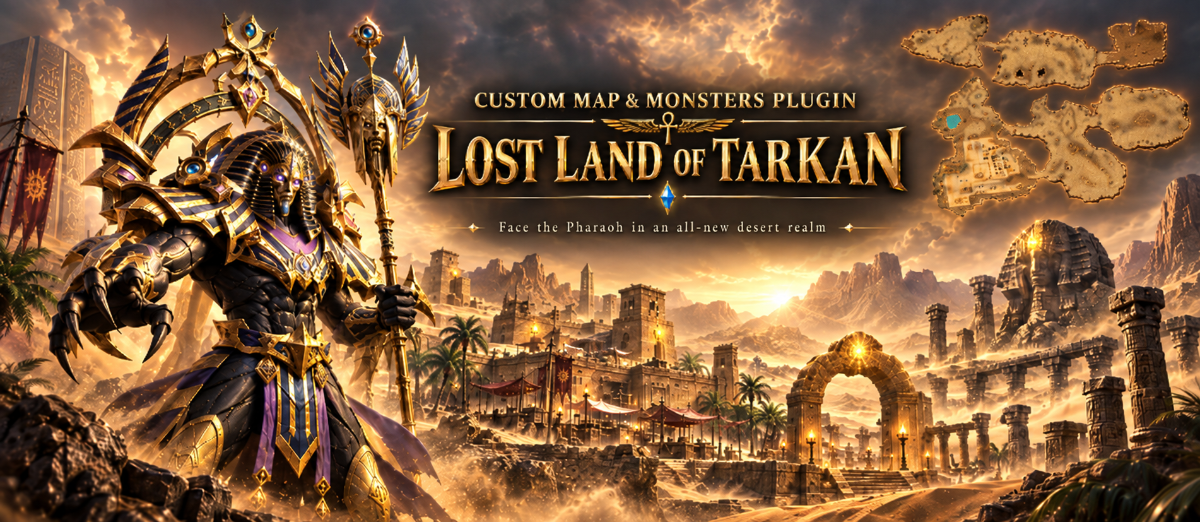
The plugin loads and runs your maps and monsters - it does not create them. You build a world in MU World Creator, and a monster starts from a model you make or buy. Here you register them, script them and ship them.
Custom Maps & Monsters
Add worlds and monsters the client never shipped with, and give each one its own behaviour in Lua. No client patching, no server rebuild.
The plugin loads and runs your maps and monsters - it does not create them. You build a world in MU World Creator, and a monster starts from a model you make or buy. Here you register them, script them and ship them.
Worlds
- Own maps - past the client's own 146, numbered up to 200
- Treated as stock - walking, drops, warps and PvP rules, like any original map
- Fog - linear, exp or exp2, your own colour and range
- Music - for the map, for safe zones, and for up to 30 areas
- Terrain lights - placed and moved from the script
- Weather - presets you pick per map
Monsters
- Own monsters - ids up to 2499, with model, textures and sounds
- Look - scale, glow, render flags, hidden and additive meshes
- Motion - animation speed per action, walking speed
-
Weapons - one in each hand, from
ItemList.xml - Name - the text above its head, how high it floats, its elemental effect
- Player skills - the server picks the targets, the client draws the hit, your script the caster
Lua
- One script each - per map and per monster, sandboxed
- Effects by file name - no version-specific id in your scripts
- Drawing - sprites, billboards, camera-facing beams, arrows
- Sound and light - play sounds, add terrain lights, read the world clock
- Handlers - map load, every frame, world render, monster create / render / attack
In the package
- Lost Land of Tarkan - a finished map, ready to drop in
- Pharaoh - a finished monster, casting Raining Arrow from its own script
- Tarkan Copy - reference map: a stock world copied and renumbered, start to finish
- Hydra - reference monster: model, textures, sounds and script, start to finish
- Script library - weather presets, monster skill effects, shared helpers
Ship it protected
-
Your own key - scripts pack to
.gsc, configs to.xdc, terrain optionally keyed - Dev mode - runs your plain files, limited to the accounts you name
Bundled tool
- IGC File Encrypt - packs scripts, configs and terrain, and renumbers a copied world
Full documentation: https://github.com/srv-config/Configs-Preview/wiki/CustomGame-Home
Custom Ranks & Extended VIP System
Animated rank icons above players, based on Castle Siege lord, VIP type, resets or level, with up to 100 ranks. Season 16 and above.
Custom Ranks & Extended VIP System
This plugin is optional and exclusive extension of the Season 16 and above.
Custom Ranks can set animated icons (rank images) above players based on various factors:
- Castle Siege / Ice Wind Valley lord
- VIP Type
- Resets Min/Max
- Level Min/Max

System supports up to 100 custom ranks which can be configured in CustomRank.bmd/CustomRank.xml
The animated rank icons consist of OZT (TGA) file with 13 frames, if you want to modify the icons you need to take example of already existing ones.
The icons are located in Client/Data/Custom/Interface. Use Toolkit Premium to convert it to TGA and back to OZT as required.
Chinese version is located in Data/Custom/Interface_china/ you just need to rename it to /Interface/
The default offer contains premade icons by us with
- VipLevels 1-14
- Ice wind castle Lord Icon
- Castle Siege Icon
VIP SETTINGS Extension (extend current VIP system with additional extra options)
- HP BONUS
- PVP Attack Bonus
- PVM Attack Bonus
- Decrease Damage Bonus
- Increase Defense Bonus
- SD Bonus
- AG Bonus
Config preview: CHECK HERE
* Plugin is configurable from VipSettings.xml and CustomRanks.xml file shipped along with default server pack
Custom UI (Player Ranking, Add Stat)
An in-game Top 100 players ranking panel and an Add Stat window that can split free points equally.
Custom UI (Player Ranking, Add Stat)
The plugin opens ability to use of in-game players ranking panel.
Current Features
- Top 100 players display
- Display of character: Name, Class, Total Level, Resets and Map
- Text overflow auto-scrolling
- Colorized podium places
- Auto refresh every 5 minutes
- Add Individual Stats
- Equally split free stats among all stats
Screenshots


The plugin is controlled from \Data\Plugins\UIManager.ini
Daily Rewards
Daily login rewards, with weekly and monthly bonuses for consecutive days.
Daily Rewards
This plugin introduces a daily login reward system, encouraging players to join your game regularly. Each day a player logs in, they receive a reward — and the more consecutive days they play, the greater their chances of unlocking exciting weekly and monthly bonuses! Keep your community engaged, motivated, and coming back for more.
Plugin is currently availble for Season 20.2.2.2 S and up. Planned versions support are: 20.1.3.16 S, 20.2.3.x
Features
- Daily Rewards – Players earn a reward each day they log in,
- Weekly Bonus – Special bonus for logging in every day of the week,
- Monthly Bonus – Exclusive reward for logging in every day of the month,
- Minimum Character Level Requirement – Only accounts with a character above the configured level can claim rewards,
- Minimum VIP Level Requirement – Restrict reward eligibility to players with a specified VIP level or higher,
- Auto-Open Rewards Window – Rewards window pops up automatically upon login if a reward is available.
Reward types
- Items – Grant any in-game items as prizes,
- Zen – Award in-game currency,
- Ruud – Reward players with Ruud points,
- W/GP Coins – Give W Coins or Goblin Points,
- Gens Contribution – Increase a player’s Gens ranking points,
- Experience – Boost character EXP,
- Level-Up Points – Award additional stat points,
- Levels – Instantly increase a character’s level.
Screenshots


Config Preview
<?xml version="1.0" encoding="utf-8"?>
<!--
// ============================================================
// == INTERNATIONAL GAMING CENTER NETWORK
// == www.igcn.mu
// == (C) 2010-2025 IGC-Network (R)
// ~~~~~~~~~~~~~~~~~~~~~~~~~~~~~~~~~~~~~~~~~~~~~~~~~~~~~~~~~~
// == File is a part of IGCN Group MuOnline Server files.
// ============================================================
//
//~~ Changes to the file must be reflected on game client side and encrypted to .bmd using ToolKit Lite or Premium "IGC File Enc/Dec (XML)" tool, \Data\Local\DailyReward.bmd
//
// ### DailyRewards ###
//	Enable: Deactivate or activate the system, 0/1
//	ActiveMonths: Whether or not, set specific month active, 0/1
//	MinCharacterLevel: Minimum level of any character within account to get reward (sum of regular and master)
//	MinVipLevel: Minimum VIP level to get reward, -1 if not applies
//	OpenRewardWindowOnGameJoin: Whether or not, open reward window after joining the game, 0/1, applies if combination if conditions is met:
//		~ OpenRewardWindowOnGameJoin is set to 1
//		~ Current month is active for rewards
//		~ Minimum character level is met
//		~ Minimum VIP level is met
//
//	Password: A password used by ToolKit ServerInfo (XML) editor to encode the file, max 8 characters
//
// ### DailyRewards::DailyReward|WeeklyBonus|MonthlyBonus ###
//	Number: Number of reward day, 1-31
//	Exp: Reward Exp, max 9223372036854775807, used by server
//	LevelUp: Number of levels to level up the character, used by server
//	LevelUpPoints: Number of level up points to add, used by server
//	GensContributions: Number of gens contributions to add, used by server
//	EventBagID: Event Item Bag ID to use to reward item, used by server
//	LangID: Lang ID from CustomText.bmd (XML), DailyReward section used to display reward info, used by client, -1 if not applies
//~~~~~~~~~~~~~~~~~~~~~~~~~~~~~~~~~~~~~~~~~~~~~~~~~~~~~~~~~~~~~~~~~~~~~~~~~~~~~~~~~~~~~~~~~~~~~~~~~~~~~~~~~~~~~~~~~~~~~~~~~~~~~~~~~~
//~~ Notes:
//~~ To collect weekly reward, all current week days must be collected
//~~ To collect monthly reward, all four weeks rewards must be collected
//~~~~~~~~~~~~~~~~~~~~~~~~~~~~~~~~~~~~~~~~~~~~~~~~~~~~~~~~~~~~~~~~~~~~~~~~~~~~~~~~~~~~~~~~~~~~~~~~~~~~~~~~~~~~~~~~~~~~~~~~~~~~~~~~~~
//
// STRICTLY NO COMMENTS INSIDE TAGS
-->
<DailyRewards Enable="1" ActiveMonths="1;1;1;1;1;1;1;1;1;1;1;1" MinCharacterLevel="1" MinVipLevel="-1" OpenRewardWindowOnGameJoin="1" Password="VbFgthGv">
	<DailyReward>
		<Day Number="1" Exp="-1" LevelUp="0" LevelUpPoints="0" GensContributions="0" EventBagID="1300" LangID="100" />
		<Day Number="2" Exp="-1" LevelUp="0" LevelUpPoints="0" GensContributions="0" EventBagID="1301" LangID="101" />
		<Day Number="3" Exp="-1" LevelUp="0" LevelUpPoints="0" GensContributions="0" EventBagID="1302" LangID="102" />
		<Day Number="4" Exp="-1" LevelUp="0" LevelUpPoints="0" GensContributions="0" EventBagID="1303" LangID="103" />
		<Day Number="5" Exp="-1" LevelUp="0" LevelUpPoints="0" GensContributions="0" EventBagID="1304" LangID="104" />
		<Day Number="6" Exp="-1" LevelUp="0" LevelUpPoints="0" GensContributions="0" EventBagID="1305" LangID="105" />
		<Day Number="7" Exp="-1" LevelUp="0" LevelUpPoints="0" GensContributions="0" EventBagID="1306" LangID="106" />
		<Day Number="8" Exp="-1" LevelUp="0" LevelUpPoints="0" GensContributions="0" EventBagID="1307" LangID="107" />
		<Day Number="9" Exp="-1" LevelUp="0" LevelUpPoints="0" GensContributions="0" EventBagID="1308" LangID="108" />
		<Day Number="10" Exp="-1" LevelUp="0" LevelUpPoints="0" GensContributions="0" EventBagID="1309" LangID="109" />
		<Day Number="11" Exp="-1" LevelUp="0" LevelUpPoints="0" GensContributions="0" EventBagID="1310" LangID="110" />
		<Day Number="12" Exp="-1" LevelUp="0" LevelUpPoints="0" GensContributions="0" EventBagID="1311" LangID="111" />
		<Day Number="13" Exp="-1" LevelUp="0" LevelUpPoints="0" GensContributions="0" EventBagID="1312" LangID="112" />
		<Day Number="14" Exp="-1" LevelUp="0" LevelUpPoints="0" GensContributions="0" EventBagID="1313" LangID="113" />
		<Day Number="15" Exp="-1" LevelUp="0" LevelUpPoints="0" GensContributions="0" EventBagID="1314" LangID="114" />
		<Day Number="16" Exp="-1" LevelUp="0" LevelUpPoints="0" GensContributions="0" EventBagID="1315" LangID="115" />
		<Day Number="17" Exp="-1" LevelUp="0" LevelUpPoints="0" GensContributions="0" EventBagID="1316" LangID="116" />
		<Day Number="18" Exp="-1" LevelUp="0" LevelUpPoints="0" GensContributions="0" EventBagID="1317" LangID="117" />
		<Day Number="19" Exp="-1" LevelUp="0" LevelUpPoints="0" GensContributions="0" EventBagID="1318" LangID="118" />
		<Day Number="20" Exp="-1" LevelUp="0" LevelUpPoints="0" GensContributions="0" EventBagID="1319" LangID="119" />
		<Day Number="21" Exp="-1" LevelUp="0" LevelUpPoints="0" GensContributions="0" EventBagID="1320" LangID="120" />
		<Day Number="22" Exp="-1" LevelUp="0" LevelUpPoints="0" GensContributions="0" EventBagID="1321" LangID="121" />
		<Day Number="23" Exp="-1" LevelUp="0" LevelUpPoints="0" GensContributions="0" EventBagID="1322" LangID="122" />
		<Day Number="24" Exp="-1" LevelUp="0" LevelUpPoints="0" GensContributions="0" EventBagID="1323" LangID="123" />
		<Day Number="25" Exp="-1" LevelUp="0" LevelUpPoints="0" GensContributions="0" EventBagID="1324" LangID="124" />
		<Day Number="26" Exp="-1" LevelUp="0" LevelUpPoints="0" GensContributions="0" EventBagID="1325" LangID="125" />
		<Day Number="27" Exp="-1" LevelUp="0" LevelUpPoints="0" GensContributions="0" EventBagID="1326" LangID="126" />
		<Day Number="28" Exp="-1" LevelUp="0" LevelUpPoints="0" GensContributions="0" EventBagID="1327" LangID="127" />
		<Day Number="29" Exp="-1" LevelUp="0" LevelUpPoints="0" GensContributions="0" EventBagID="1328" LangID="128" />
		<Day Number="30" Exp="-1" LevelUp="0" LevelUpPoints="0" GensContributions="0" EventBagID="1329" LangID="129" />
		<Day Number="31" Exp="-1" LevelUp="0" LevelUpPoints="0" GensContributions="0" EventBagID="1330" LangID="130" />
	</DailyReward>

	<WeeklyBonus>
		<Week Number="1" Exp="100000" LevelUp="0" LevelUpPoints="20" GensContributions="0" EventBagID="1331" LangID="131" />
		<Week Number="2" Exp="150000" LevelUp="0" LevelUpPoints="25" GensContributions="0" EventBagID="1332" LangID="132" />
		<Week Number="3" Exp="200000" LevelUp="0" LevelUpPoints="30" GensContributions="0" EventBagID="1333" LangID="133" />
		<Week Number="4" Exp="250000" LevelUp="0" LevelUpPoints="35" GensContributions="0" EventBagID="1334" LangID="134" />
	</WeeklyBonus>

	<MonthlyBonus Exp="1000000" LevelUp="0" LevelUpPoints="50" GensContributions="0" EventBagID="1335" LangID="135" />
</DailyRewards>
Extended Inventory Use & Consume Item System
Two systems for new talisman-like items worn in the inventory and new consumable items.
Extended Inventory Use & Consume Item System
Extended Inventory Use & Consume Item System
This plugin bundle includes 2 new systems which lets you greatly expand and alter builds of players (specially combined with ItemOptionSystem_Exc.bmd)
Using Extended Inventory Use system you can create new items similar to Talismans, Hawk / Goat figurine etc.
You may wear just one item of same item id at a time, but you can use configurable amount of InventoryUseItems.
This is good system that gives you ability to sell unique featured items via cash shop.
You may also bind a Buff Effect from BuffEffectManager to the item, bind options from ItemOptionSystem_Exc.xml plugin, or ItemOptionManager.xml.

Consume Item System:
Similar to fruit system where you may consume fruits, but instead of receiving fruit points, you receive directly configurable amount per item LevelUpPoints.
Its possible to set the limit how many points one can consume in total.
Extended Item Option
A jewel-driven progression system: nearly 60 options, 60 jewels and up to 10 options per item.
Extended Item Option
Extended Option System
A jewel-driven progression system that lets players push their gear beyond base stats - nearly 60 options, 60 jewels, up to 10 options per item, level-gated by success rate, fully configurable.

How it works
One jewel = one option. Using it rolls a success chance; on success the option levels up, on failure a configured penalty applies - burn, reset, downgrade, or item destruction, depending on how you set it. The jewel is always consumed, win or lose. No extra materials needed - the jewel itself is the entire cost, so pricing it in your shop is straightforward.
Real risk curve, not a flat grind
Example - Max HP option, 5 levels:
| Level | Value | Success Rate |
|---|---|---|
| 1 | +100 | 90% |
| 2 | +200 | 70% |
| 3 | +300 | 50% |
| 4 | +400 | 30% |
| 5 | +500 | 15% |
Values scale up while success rates scale down, so the risk grows on its own with every level - no extra config needed to keep the top tiers meaningful.
		<!-- Option 0: Max HP reduced %d -->
		<Jewel Cat="19" Index="230" OptionId="0" BuffIndex="1" BuffEffectType="1" Enable="1">
			<Restrictions AllowExcellent="1" AllowSocket="1" AllowAncient="1" AllowMastery="1" AllowLegendary="1" DenyKindA="" DenyKindB="" />
			<Option Level="1" Value="3" SuccessRate="90" FailType="3" OptionProbability="5" BuffValue="10" BuffProbability="10000" BuffDuration="10000" />
			<Option Level="2" Value="6" SuccessRate="70" FailType="3" OptionProbability="10" BuffValue="10" BuffProbability="10000" BuffDuration="10000" />
			<Option Level="3" Value="9" SuccessRate="50" FailType="3" OptionProbability="15" BuffValue="10" BuffProbability="10000" BuffDuration="10000" />
			<Option Level="4" Value="12" SuccessRate="30" FailType="3" OptionProbability="20" BuffValue="10" BuffProbability="10000" BuffDuration="10000" />
			<Option Level="5" Value="15" SuccessRate="15" FailType="3" OptionProbability="25" BuffValue="10" BuffProbability="10000" BuffDuration="10000" />
		</Jewel>
Full control over who gets what
You decide exactly which item types each option can touch - globally across the whole system, or per jewel. Want ancients and legendaries left untouched by one specific jewel while everything else stays open? One setting handles it.
Nearly 60 ready-made options & jewels
Combat (double damage, damage reduction, damage reflect), PvP-exclusive effects (instant kill, full damage rebound, brief invisibility), and economy bonuses (EXP, drop rate, hunt points) - each with its own level curve. Enable only what fits your server, disable the rest.
Level count per option isn't hardcoded - it's defined entirely in the config, with each level free to set its own value, success rate, and failure outcome. That means any option can be rebalanced or extended at any time, without touching the core system.


Config preview available
Full XML configuration is available for preview here: ExtendedOptionSystem.xml
Extended Notices System
PvP kill, item pick-up, monster kill and monster spawn notices, all customizable.
Extended Notices System
The extended notices system offers ability to bring more color to the game by banging players with range of notices that may bring a fresh wind breeze to interaction of player and game-play.
The key features are:
- PvP kill notices
- Customizable item pick up notices
- Customizable monster kill notices
- Customizable monster spawn notice with ability of keeping the monster immune for certain amount of time
Config overview: VIEW
* Plugin is configurable from NoticeSystem.xml file shipped along with default server pack
Flags & Shop
39 new flags worn on the back, a flag shop at the Guild Master NPC and bonus EXP per flag.
Flags & Shop
The plugin brings 39 new flag items (character & national), when activated, appear on the back like hussar wings.
Along with the flags, a new shop is available from Guild Master NPC, the flags can be purchased from.
System allows to add custom flags within category 20. Additionally, bonus exp can be configured per flag.

Config overview: https://github.com/srv-config/x19-P1-3/blob/master/Data/Plugins/FlagItemOption.xml
Hide & Seek Event
Let the players play hide and seek and win a reward of your choice.
Hide & Seek Event
Hide & Seek Event
Let the players play hide and seek! The winners have ability to obtain a reward of your choice.
The event can run in two modes:
- Find spawned NPC to win
- Find a monster and kill it to win (coming soon)
Explore attached config to see configuration possibilities.
Hunt Point System
A new game variable: Hunt Points and an enchantment buff for 8 basic abilities. Who is the real Wild Hunt this week?
Hunt Point System
Introducing Hunt Point System
The Hunt Point System adds new variable in to the game - Hunt Points and new ability enchantment buff that increases 8 character basic abilities
- Defense
- Mana
- HP
- HP Recovery
- Damage
- Wizardry
- Critical Damage
- Excellent Damage
Hunt points are split into 2 categories:
- Active Hunt Points
- Inactive Hunt Points
Active Hunt Points are already equally distrusted among the abilities from the very beginning, however Inactive Hunt Points player can distribute to one of his selected abilities without sacrificing a point from existing ones.
Each player by default starts with active 2500 Hunt Points which are equally split among all the abilities and granting a little bonus on each of the ability.
Once the player meets minimum requirements to join Hunt Point system, the server will bind a custom buff to the player which will display the enchantments, active hunt points and inactive hunt points in real time by using hover over the buff.

Hunt Point Battle System
To gain more Hunt Points, players can battle between each other using command /huntbattle, they are moved to your predefined location, and become invisible for 30 seconds or until begin battle, the winner steals part of the buff and hunt points from the loser. The server does not generate new hunt points, they must be taken from existing players. Weekly the hunt points are reset, and the leaders receive an bonus Inactive points based on his week result.
Hunt Point Quest System
Players can give bonus to the abilities by completing quests (item based), these bonuses are applied to the abilities as extra without considering calculation of Hunt Points.
Hunt point System offers wide configuration / customization capabilities
Ice Wind Castle Event
A PvP event in Devias 3, similar to Castle Siege: keep the throne as long as you can, with unique rewards.
Ice Wind Castle Event
The Ice Valley Castle is optional and exclusive PvP event with its logic similar to Castle Siege. It takes a place in Devias 3 area.
The key mission is to keep the throne occupied as long as possible and do not let other guilds take over it. The event offers unique reward system, such as special character flame effect for castle owners, closed access to selected map, coins and items.
Unique to this event are effects, previously mentioned flames over characters and screen shakes within the event.
Config Overview: VIEW
* Plugin is configurable from IceWindValley.xml file shipped along with default server pack
Item Banks
Unlimited item storage: your own bank types and upgrades, free or paid, with an optional withdrawal commission.
Item Banks
Item Banks are new unlimited way of storing items. Define own bank types and offer them FREE or Paid, with or without withdrawal commission.
Features
- Define and offer own bank types
- Define and offer bank upgrades
- Define currency and cost per bank or upgrade
- Colorize your banks or upgrades with defined colors
- Deposit up to 2147483647 items per bank
- Withdraw items to inventory or if lacking space the items will go directly to Gremory Case
- Define withdrawal commission fee or keep withdrawal free
- Customizable texts
Video Preview
Configuration preview
<?xml version="1.0" encoding="utf-8"?>
<!--
// ============================================================
// == INTERNATIONAL GAMING CENTER NETWORK
// == www.igcn.mu
// == (C) 2010-2025 IGC-Network (R)
// ~~~~~~~~~~~~~~~~~~~~~~~~~~~~~~~~~~~~~~~~~~~~~~~~~~~~~~~~~~
// == File is a part of IGCN Group MuOnline Server files.
// ============================================================
//
// ### ItemBank ###
//	Enable: Whether or not, activate the system, 0/1
//	Password: A password used by ToolKit ServerInfo (XML) editor to encode the file, max 8 characters
//
// ### ItemBank::BankList::Bank ###
//	Enable: Whether or not, activate specific bank, 0/1
//	Name: Display name of the bank
//	Type: Unique bank ID
//	ItemCat: Item category the bank applies to, see ItemList.xml
//	ItemIndex: Item index the bank applies to, see ItemList.xml
//~~~~~~~~~~~~~~~~~~~~~~~~~~~~~~~~~~~~~~~~~~~~~~~~~~~~~~~~~~~~~~~~~~~~~~~~~~~~~~~~~~~~~~~~~~~~~~~~~~~~~~~~~~~~~~~~~~~~~~~~~~~~~~~~~~~~~~~~~~~~~~
//~~ The bank can store various type of items, either overlapped or not, however it is limited to basic item types without any special options
//~~~~~~~~~~~~~~~~~~~~~~~~~~~~~~~~~~~~~~~~~~~~~~~~~~~~~~~~~~~~~~~~~~~~~~~~~~~~~~~~~~~~~~~~~~~~~~~~~~~~~~~~~~~~~~~~~~~~~~~~~~~~~~~~~~~~~~~~~~~~~~
//
//	ItemLevel: Level of item defined for the bank
//	BaseMaxItemCount: Number of slots bank slots available after bank purchase
//	PurchaseCoinType:
//		~ -1: Free
//		~ 0: Zen
//		~ 1: WCoin
//		~ 2: Goblin Point
//		~ 3: Ruud
//
//	PurchasePrice: Value of the bank purchase
//	TextColor: Color of the text displayed on the bank row, R;G;B
//
// ### ItemBank::BankList::Bank::Withdraw ###
//	CommissionCoinType:
//		~ -1: Free
//		~ 0: Zen
//		~ 1: WCoin
//		~ 2: Goblin Point
//		~ 3: Ruud
//
//	CommissionValue: Value of commission to collect every withdrawal
//
// ### ItemBank::BankList::Bank::UpgradeList::Upgrade ###
//	Level: Bank upgrade level, should start from 1 and increase sequentially
//	MaxItemCount: Number of slots offered with the upgrade
//	CoinType:
//		~ -1: Free
//		~ 0: Zen
//		~ 1: WCoin
//		~ 2: Goblin Point
//		~ 3: Ruud
//	Price: Value of the bank upgrade
//	TextColor: Color of the text displayed on the bank upgrade option row, R;G;B
//
// STRICTLY NO COMMENTS INSIDE TAGS
-->

<ItemBank Enable="1" Password="GhyjukJi">
	<BankList>
		<Bank Enable="1" Name="Bless Bank (Z) - (Commission Applies)" Type="0" ItemCat="14" ItemIndex="13" ItemLevel="0" BaseMaxItemCount="10" PurchaseCoinType="-1" PurchasePrice="0" TextColor="255;255;0">
			<Withdraw CommissionCoinType="0" CommissionValue="10" />
			<UpgradeList>
				<Upgrade Level="1" MaxItemCount="20" CoinType="0" Price="5" TextColor="255;0;0" />
				<Upgrade Level="2" MaxItemCount="30" CoinType="0" Price="10" TextColor="0;255;0" />
				<Upgrade Level="3" MaxItemCount="40" CoinType="0" Price="30" TextColor="0;0;255" />
				<Upgrade Level="4" MaxItemCount="50" CoinType="0" Price="50" TextColor="255;0;0" />
				<Upgrade Level="5" MaxItemCount="60" CoinType="0" Price="100" TextColor="0;255;255" />
			</UpgradeList>
		</Bank>
		<Bank Enable="1" Name="Soul Bank (Z) - (Commission Applies)" Type="1" ItemCat="14" ItemIndex="14" ItemLevel="0" BaseMaxItemCount="10" PurchaseCoinType="-1" PurchasePrice="0" TextColor="0;255;0">
			<Withdraw CommissionCoinType="0" CommissionValue="10" />
			<UpgradeList>
				<Upgrade Level="1" MaxItemCount="20" CoinType="0" Price="5" TextColor="255;0;0" />
				<Upgrade Level="2" MaxItemCount="30" CoinType="0" Price="10" TextColor="0;255;0" />
				<Upgrade Level="3" MaxItemCount="40" CoinType="0" Price="30" TextColor="0;0;255" />
				<Upgrade Level="4" MaxItemCount="50" CoinType="0" Price="50" TextColor="255;0;0" />
				<Upgrade Level="5" MaxItemCount="60" CoinType="0" Price="100" TextColor="0;255;255" />
			</UpgradeList>
		</Bank>
		<Bank Enable="1" Name="Bless Bank (W) - (Commission Free)" Type="2" ItemCat="14" ItemIndex="13" ItemLevel="0" BaseMaxItemCount="10" PurchaseCoinType="1" PurchasePrice="10" TextColor="0;255;255">
			<Withdraw CommissionCoinType="-1" CommissionValue="10" />
			<UpgradeList>
				<Upgrade Level="1" MaxItemCount="20" CoinType="1" Price="5" TextColor="255;0;0" />
				<Upgrade Level="2" MaxItemCount="30" CoinType="1" Price="10" TextColor="0;255;0" />
				<Upgrade Level="3" MaxItemCount="40" CoinType="1" Price="30" TextColor="0;0;255" />
				<Upgrade Level="4" MaxItemCount="50" CoinType="1" Price="50" TextColor="255;0;0" />
				<Upgrade Level="5" MaxItemCount="60" CoinType="1" Price="100" TextColor="0;255;255" />
			</UpgradeList>
		</Bank>
		<Bank Enable="1" Name="Soul Bank (W) - (Commission Free)" Type="3" ItemCat="14" ItemIndex="14" ItemLevel="0" BaseMaxItemCount="10" PurchaseCoinType="1" PurchasePrice="10">
			<Withdraw CommissionCoinType="-1" CommissionValue="10" />
			<UpgradeList>
				<Upgrade Level="1" MaxItemCount="20" CoinType="1" Price="5" TextColor="255;0;0" />
				<Upgrade Level="2" MaxItemCount="30" CoinType="1" Price="10" TextColor="0;255;0" />
				<Upgrade Level="3" MaxItemCount="40" CoinType="1" Price="30" TextColor="0;0;255" />
				<Upgrade Level="4" MaxItemCount="50" CoinType="1" Price="50" TextColor="255;0;0" />
				<Upgrade Level="5" MaxItemCount="60" CoinType="1" Price="100" TextColor="0;255;255" />
			</UpgradeList>
		</Bank>
		<Bank Enable="1" Name="Chaos Bank (R) - (Commission Applies)" Type="4" ItemCat="12" ItemIndex="15" ItemLevel="0" BaseMaxItemCount="10" PurchaseCoinType="3" PurchasePrice="10">
			<Withdraw CommissionCoinType="3" CommissionValue="10" />
			<UpgradeList>
				<Upgrade Level="1" MaxItemCount="20" CoinType="3" Price="5" TextColor="255;0;0" />
				<Upgrade Level="2" MaxItemCount="30" CoinType="3" Price="10" TextColor="0;255;0" />
				<Upgrade Level="3" MaxItemCount="40" CoinType="3" Price="30" TextColor="0;0;255" />
				<Upgrade Level="4" MaxItemCount="50" CoinType="3" Price="50" TextColor="255;0;0" />
				<Upgrade Level="5" MaxItemCount="60" CoinType="3" Price="100" TextColor="0;255;255" />
			</UpgradeList>
		</Bank>
		<Bank Enable="1" Name="Chaos Bank (R) - (Commission Applies)" Type="5" ItemCat="12" ItemIndex="15" ItemLevel="0" BaseMaxItemCount="10" PurchaseCoinType="3" PurchasePrice="10">
			<Withdraw CommissionCoinType="3" CommissionValue="10" />
			<UpgradeList>
				<Upgrade Level="1" MaxItemCount="20" CoinType="3" Price="5" TextColor="255;0;0" />
				<Upgrade Level="2" MaxItemCount="30" CoinType="3" Price="10" TextColor="0;255;0" />
				<Upgrade Level="3" MaxItemCount="40" CoinType="3" Price="30" TextColor="0;0;255" />
				<Upgrade Level="4" MaxItemCount="50" CoinType="3" Price="50" TextColor="255;0;0" />
				<Upgrade Level="5" MaxItemCount="60" CoinType="3" Price="100" TextColor="0;255;255" />
			</UpgradeList>
		</Bank>
	</BankList>
</ItemBank>
Item Price System
Sell and buy selected items for the coins you choose.
Item Price System
<?xml version="1.0" encoding="utf-8"?>
<!--
// ============================================================
// == INTERNATIONAL GAMING CENTER NETWORK
// == www.igcn.mu
// == (C) 2023 IGC-Network (R)
// ~~~~~~~~~~~~~~~~~~~~~~~~~~~~~~~~~~~~~~~~~~~~~~~~~~~~~~~~~~
// == File is a part of IGCN Group MuOnline Server files.
// ============================================================
//
//~~ Changes to the file must be reflected on game client side and encrypted to .bmd using ToolKit Lite or Premium "IGC File Enc/Dec (XML)" tool, \Data\Local\ItemPriceSystem.bmd
//
// ### ItemPriceSystem ###
//	Password:
//
// ### ItemPriceSystem::ItemSell ###
//	Enable: Deactivates or activates item sell price override, 0/1
//	SellOptionSpec:
//		~ 0: Accepts excellent items with any option type but minimum number defined in ExcOption attribute
//		~ 1: Accepts excellent items of specified options IDs, if defined, 0/1
//
// ### ItemPriceSystem::ItemSell::Item ###
//	Cat: Category of item, see ItemList.xml
//	Index: Index of item, see ItemList.xml
//	Level: Level of item, 0-15 or -1 for any
//	CoinType:
//		~ 0: WCoin
//		~ 1: Goblin Point
//		~ 2: Zen
//		~ 3: Ruud
//	CoinValue: Value of selected coin type
//	SetOption: Is ancient item, 0/1
//	SetTier: Tier of ancient item to check
//		~ 0: No Tier
//		~ 1: Tier I
//		~ 2: Tier II
//
//	ExcOption: Minimum number of excellent options
//	ExcCode: X;X;X;X;X;X;X;X;X: Defined excellent options, the 'X' is excellent option ID based on ExcellentOptions.xml, maximum 9 options can be defined
//~~~~~~~~~~~~~~~~~~~~~~~~~~~~~~~~~~~~~~~~~~~~~~~~~~~~~~~~~~~~~~~~~~~~~~~~~~~~~~~~~~~~~~~~~~~~~~~~~~~~~~~~~~~~~~~~~~
//~~ By adding item to the list, it will be sold in regular shop for defined Coin Type instead of Zen unless set so
//~~~~~~~~~~~~~~~~~~~~~~~~~~~~~~~~~~~~~~~~~~~~~~~~~~~~~~~~~~~~~~~~~~~~~~~~~~~~~~~~~~~~~~~~~~~~~~~~~~~~~~~~~~~~~~~~~~
//
// ### ItemPriceSystem::ItemBuy ###
//	Enable: Deactivates or activates item buy price override, 0/1
//
// ### ItemPriceSystem::ItemBuy::Item ###
//	Cat: Category of item, see ItemList.xml
//	Index: Index of item, see ItemList.xml
//	ItemMinLevel: Minimum level of item, 0-15
//	ItemMaxLevel: Maximum level of item 0-15
//	CoinType:
//	~ 0: WCoin
//	~ 1: Goblin Point
//	~ 2: Zen
//	~ 3: Ruud
//
//	CoinValue: Value of selected coin type
//
// ### ItemPriceSystem::Strings::String ###
//	Id: Unique string ID
//	Text: Text to display
//
// STRICTLY NO COMMENTS INSIDE TAGS
-->

<ItemPriceSystem Password="WErt$4t3">
	<ItemSell Enable="1" SellOptionSpec="1">
		<Item Cat="0" Index="2" Level="-1" CoinType="3" CoinValue="50" ExcOption="1" ExcCode="0;1;2;" />
		<Item Cat="14" Index="13" Level="-1" CoinType="0" CoinValue="50" SetOption="0" SetTier="0" ExcOption="0" ExcCode="" />
	</ItemSell>

	<ItemBuy Enable="1">
		<Item Cat="0" Index="14" ItemMinLevel="0" ItemMaxLevel="0" CoinType="1" CoinValue="160000"/>
	</ItemBuy>

	<Strings>
		<String Id="0" Text="WCoin" />
		<String Id="1" Text="GP" />
		<String Id="2" Text="Zen" />
		<String Id="3" Text="Ruud" />
		<String Id="4" Text="Selling Price: %d %s" />
		<String Id="5" Text="Buying Price: %d %s" />
	</Strings>
</ItemPriceSystem>
Plugin function is to override prices in NPC Shops with custom config you set.
Sell System
If you configure Jewel of Bless to have value of 10 WCoin, the NPC will reward you with 10 WCoin instead of Zen upon selling the item.
Buy system
If you configure Jewel of Bless to have value of 10 WCoin, the NPC will require you to pay with 10 WCoin instead of Zen upon purchasing the item.
This system works ONLY with NPC Shops (ShopList.xml) it does not override prices of Cash Shop or any other possible way to buy/sell items.
Configuration file can be found in \Data\Plugins\ItemPriceSystem.xml
Jewel Upgrade System
Up to 10 new custom jewels that upgrade items from one to another or extend their properties.
Jewel Upgrade System
Allows adding up to 10 new custom jewels, that can be used to upgrade item from one to another, or extend item properties with endless possibilities of what can be achieved.
Reference config file in Data/Customs/JewelUpgradeSystem.xml
Limited Use Command bundle
Unlimited custom commands that reward items, buffs, Zen or Ruud a limited number of times, plus extra commands.
Limited Use Command bundle
Extend your server with ability to create unlimited custom commands!
LimitedUseCommand.xml adds ability to create new commands that can be used under certain circumstances and for limited number of times to reward users with items, buffs, zen or ruud.
This bundle also includes extra commands
/decstr - Decrease stat points by X

/decagi - Decrease stat points by X

/decvit - Decrease stat points by X

/decene - Decrease stat points by X

/deccmd - Decrease stat points by X

/huntstore - Opens your defined store in middle of battle field. User does not need to move to city

/huntware - Opoens warehouse in middle of battle field. User does not need to move to city to use warehouse
LuaAPI Core
Script the logic of your server in Lua: events, rewards, bosses, PvP and economy, with 60 event hooks and no rebuilds.
LuaAPI Core
LuaAPI Core: Lua scripting for your server
Script your server's logic in Lua: events, rewards, bosses, PvP, economy, guild automation and more. React to the game as it happens, change almost anything at runtime, and persist it in your database. No DLL edits, no rebuilds.
React to the game
- 60 event hooks across the game loop: kills, deaths, logins, level-ups, resets, item pickups, shop and cash-shop transactions, map changes, commands, server lifecycle
- Sync hooks can allow or block an action (item sale, item use, cash-shop buy) by return value
Players, items, economy
- Read and write money, ruud, WCoin, goblin points, stats, level, experience and resets
- Full inventory control: create, insert, move and remove items
- Push live HP / mana / shield / AG updates to the client the moment you change them
Monsters & events
- Spawn and despawn monsters and NPCs anywhere, with elemental attributes
- Loop players or monsters on a map, in a party, in a guild, or nearby, in one call
- Build invasions, wave events and boss spawns, scheduled by timers or a timetable
Buffs & combat
- Apply any buff from script with custom duration, value and element, and schedule its expiry
- Run PvP and zone logic; gate item actions through the same guard chain the client uses
Cash Shop
- React to purchases, gifts and item use
- Grant shop items straight from script
Groups
- Broadcast, reward or teleport a whole guild or party together in a single loop
Database
- Query DataServer or JoinServer directly from Lua, rows delivered to a callback
- Persist anything: currencies, cooldowns, custom stats, history
By the numbers
- 155 API functions across players, monsters, items, buffs, stats, inventory, combat, movement and timers
- 60 event hooks
- 25 namespaces, logically grouped
- 13 data structures (player, monster, item, cash-shop and query-result objects)
Ships ready to use
- Every function and callback is documented and annotated for the Lua Language Server, so VS Code gives you autocomplete, parameter names and type hints as you type. No guessing field names, no digging through headers.
Full documentation: https://github.com/srv-config/Configs-Preview/wiki
LuaUI Extension
Your own in-game windows, HUDs and panels written in Lua, reloaded on the fly.
LuaUI Extension
Lua UI Extension
Add your own in-game windows, HUDs and panels, written entirely in Lua. No client patching, no server rebuild. Both halves hot-reload with the rest of your scripts.
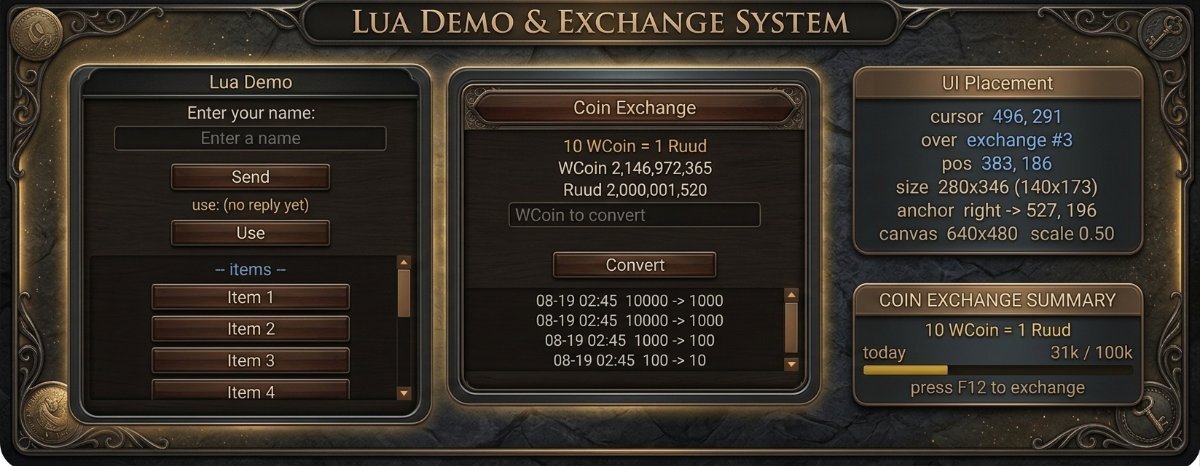
Windows that look built-in
- Floating windows the player opens and drags, drawn with the game's own frame artwork so they blend in
- Or skin them yourself from shapes and your own bitmap atlases
- Permanent HUD panels that sit on screen as if they shipped with the client
Real, interactive UI
- Labels, buttons, images, panels
- Scrollable lists with a scrollbar styled in colours or cut from your own bitmap
- Text fields with per-keystroke validation and CJK input via IME
Client and server, both in Lua
- Client LuaJIT, server Lua 5.3, wired together for you
- Your own request/answer protocol between the window and the GameServer
- The server decides what each window may do, and backs it with the database
Localised
- On-screen text comes from a per-language file, so one window fits every client
Built to iterate
- F9 hot-reload: edit, save, see it in-game, no restart
- In-game debug console for live values
- Dev mode limited to the accounts you name
Ship it protected
-
Encrypt your window scripts to
.uscwith your own key: loads in the client, unreadable to players
Bundled tools
- BitmapSlicer: slice UI atlases into named cuts, export Lua tables / JSON / C++ / PNG
- IGC File Encrypt: one-click encryption of your Lua (and XML) client files
Full documentation: https://github.com/srv-config/Configs-Preview/wiki/LuaUI-Home
Map Move NPC
Turn NPCs into movers to other maps and locations, for Zen, Coins, Ruud, Gens points or an item.
Map Move NPC
Map Move NPC Plugin
The plugin allows to configure most of existing NPCs (excluding event ones) as NPC offering a player to move to different maps and locations.
The player will be asked to pay in Zen, Coin, Ruud or even Gens Contribution Points. Additionally, on the top of that the NPC may charge specified item for his move service.


Setting overview
<?xml version="1.0" encoding="utf-8"?>
<!--
// ============================================================
// == INTERNATIONAL GAMING CENTER NETWORK
// == www.igcn.mu
// == (C) 2022 IGC-Network (R)
// ~~~~~~~~~~~~~~~~~~~~~~~~~~~~~~~~~~~~~~~~~~~~~~~~~~~~~~~~~~
// == Modify if you know what you do only!
// == File is a part of IGCN Group MuOnline Server files.
// ============================================================
//
// ### MapMoveNPC ##
//	Enable: Deactivates or activates the system, 0/1
//	DecisionTime: A time to make a decision to move with NPC (time between first and second NPC click), milliseconds
//
// ### MapMoveNPC::NPC ##
//	Index: Index of NPC, see ItemList.xml
//~~~~~~~~~~~~~~~~~~~~~~~~~~~~~~~~~~~~~~~~~~~~~~~~~~~~~~~~~~~~~~~~~~~~~~~~~~~~~~~~~~~~~~~~~~~~~~~~~~~~~~~~~~~~~~~~~~~~~~~
//~~ Most NPCs can be used, e.g. Sshop NPCs (selected NPCs are not supported, e.g. event ones)
//~~~~~~~~~~~~~~~~~~~~~~~~~~~~~~~~~~~~~~~~~~~~~~~~~~~~~~~~~~~~~~~~~~~~~~~~~~~~~~~~~~~~~~~~~~~~~~~~~~~~~~~~~~~~~~~~~~~~~~~
//
//	MapNumber: The map number to spawn the NPC
//	PosX: The X coordinate to spawn the NPC
//	PosY: The Y coordinate to spawn the NPC
//	Dir: Direction the monster/NPC looks at after spawn ~ (Spot Type: 0-3)
//		~ 0: Central
//		~ 1: South-West
//		~ 2: South
//		~ 3: South-East
//		~ 4: East
//		~ 5: North-East
//		~ 6: North
//		~ 7: North-West
//		~ 8: West
//		~ -1: Random
//	GateId: The number of Gate to use for move, see GateSettings.xml
//	CoinType: Coin type to charge for moving
//		~ 0: WCoin,
//		~ 1: Goblin Point,
//		~ 2: Zen,
//		~ 3: Ruud,
//		~ 4: Gens Contribution Points
//
//	MoveCost: A cost for moving, set to 0 to disable
//	ReqItemIndex: Category of required item for the move, see ItemList.xml
//	ReqItemLvl: Exact item level of required iten, -1 if not applies
//	ReqItemCat: Index of required item for the move, see ItemList.xml
//	ReqItemCount: Number of required items for the move, 0 to disable
//~~~~~~~~~~~~~~~~~~~~~~~~~~~~~~~~~~~~~~~~~~~~~~~~~~~~~~~~~~~~~~~~~~~~~~~~~~
//~~ System checks regular inventory for required items only
//~~~~~~~~~~~~~~~~~~~~~~~~~~~~~~~~~~~~~~~~~~~~~~~~~~~~~~~~~~~~~~~~~~~~~~~~~~
//	MinVipLevel: Minimum VIP level to use the NPC, 0 to disable
//~~~~~~~~~~~~~~~~~~~~~~~~~~~~~~~~~~~~~~~~~~~~~~~~~~~~~~~~~~~~~~~~~~~~~~~~~~
//~~ System ignores VIP level requirement of specific map
//~~~~~~~~~~~~~~~~~~~~~~~~~~~~~~~~~~~~~~~~~~~~~~~~~~~~~~~~~~~~~~~~~~~~~~~~~~
//	MaxUsePKLevel: Maximum PK level to allow use of the NPC
//	EliteMark: Activates Elite mark under NPC, 0/1
//	BuffIndex: Index of a buff effect to apply to NPC, option purpose is to improve visual effect only, so selected buffs without visual effect will be ineffective
//		~ 28: GM Talk type
//		~ 133: Immune
//		~ 157: Flames
//		~ 158: Ice
//	Text: A text shout above the NPC, displayed every 10 seconds, maximum 90 characters
//
//~~~~~~~~~~~~~~~~~~~~~~~~~~~~~~~~~~~~~~~
//~~ Maximum 300 NPCs can be defined
//~~~~~~~~~~~~~~~~~~~~~~~~~~~~~~~~~~~~~~~
//
// STRICTLY NO COMMENTS INSIDE TAGS
-->

<MapMoveNPC Enable="0" DecisionTime="10000">
	<NPC Index="256" MapNumber="0" PosX="141" PosY="135" Dir="-1" GateId="2" CoinType="2" MoveCost="1000" ReqItemCat="14" ReqItemIndex="13" ReqItemLvl="0" ReqItemCount="15" MinVipLevel="0" MaxUsePKLevel="0" EliteMark="0" BuffIndex="133" Text="I am so happy to.." />
	<NPC Index="255" MapNumber="0" PosX="144" PosY="135" Dir="-1" GateId="2" CoinType="2" MoveCost="1000" ReqItemCat="14" ReqItemIndex="13" ReqItemLvl="0" ReqItemCount="10" MinVipLevel="0" MaxUsePKLevel="0" EliteMark="0" BuffIndex="157" Text="Travel Services!" />
	<NPC Index="258" MapNumber="0" PosX="147" PosY="135" Dir="-1" GateId="2" CoinType="1" MoveCost="15" ReqItemCat="0" ReqItemIndex="0" ReqItemLvl="0" ReqItemCount="0" MinVipLevel="0" MaxUsePKLevel="0" EliteMark="1" BuffIndex="28" Text="I'll be your guide!" />
</MapMoveNPC>
Config location: \Data\Plugins\
Offline Levelling
Players keep leveling while their computer is powered off.
Offline Levelling
A powerful system allowing a player to stay exping while having his computer powered-off! The offer is optional extension to IGC.Premium / IGC.Premium Plus package.
Features - System configuration overview*
- Ability to Enable or disable entire system
- Configuration of amount and charge currency (Zen, WCoinP, WCoinC)
- Configuration of charge and attack interval time
- Per Map Settings (Disable, Currency, Amount)
- Maximum time of use of the system by normal and VIP Players
- Ability to set Offline-Levelling Character immortal
- Ability to enable automated repair of items
- Automated pick up of items with selection of Zen, Exc, Socket, Ancient
- Automated pick up of defined items
- Per character class configuration of skill priority to use
* May not be up-to date with current state
* Plugin is configurable from OfflineLevelling.xml file shipped along with default server pack
Raffle Event
Three games your players will love: Raffle, Lotto and Hit Order.
Raffle Event
The Raffle Event is great addition to game-play of every server!
Selection of three (3) games
- Raffle, buy a coupon and win a price when drawn!
- Lotto, type your numbers, buy a coupon and try your luck getting a prize when your number will win!
- Hit Order, type your numbers, buy a coupon and win the prize when you have hit the winning order!
Coupons can be purchased in game using in-game commands, /raffle, /lotto and /hitorder, using Zen, WCoin, Goblin Points or Ruud.
Configuration overview:
<?xml version="1.0" encoding="utf-8"?>
<!--
// ============================================================
// == INTERNATIONAL GAMING CENTER NETWORK
// == www.igcn.mu
// == (C) 2022 IGC-Network (R)
// ~~~~~~~~~~~~~~~~~~~~~~~~~~~~~~~~~~~~~~~~~~~~~~~~~~~~~~~~~~
// == File is a part of IGCN Group MuOnline Server files.
// ============================================================
//
// ### RaffleEvent ###
//	Enable: Deactivates or activates the event, 0/1
//
// ### RaffleEvent::ActiveDay ###
//	Sun: Enables event on Sunday, 0/1
//	Mon: Enables event on Monday, 0/1
//	Tue: Enables event on Tuesday, 0/1
//	Wed: Enables event on Wednesday, 0/1
//	Thu: Enables event on Thursday, 0/1
//	Fri: Enables event on Friday, 0/1
//	Sat: Enables event on Saturday, 0/1
//
// ### RaffleEvent::Schedule ###
//	OpenTime: Event duration, time to buy coupons after event start, minutes
//	EndTime: Time the event is closed after draw of the prize, minutes
//
// ### RaffleEvent::Raffle ###
//	MaxCoupons: Total number of coupons available in the raffle, -1 for no limit
//	UserMaxCouponBuy: Maximum number of coupons single player may purchase, -1 for no limit
//	WinnerCount: Number of Winning coupons (players) for single raffle
//	RewardItemBag: Item bag ID to issue reward from, bags must be defined in ItemBagsScript.lua
//	PriceType: Type of currency the coupons can be purchased for
//		~ 0: Zen
//		~ 1: WCoin
//		~ 2: Goblin Point
//		~ 3: Ruud
//
//	PriceMoney: Amount of money in selected currency to charge for single coupon

//
// ### HideAndSeek::Schedule::Start ###
//	Hour: Start hour, 0-23
//	Minute: Start minute: 0-59
//	Type:
//		~ 0: Raffle Event
//		~ 1: Lotto Event
//		~ 2: HitOrder Event
//
// ### RaffleEvent::Lotto ###
//	MaxCoupons: Total number of coupons available in the raffle, -1 for no limit
//	UserMaxCouponBuy: Maximum number of coupons single player may purchase, -1 for no limit
//	CouponUnique: Determines whether coupons should be unique, it will not be possible to buy two coupons with same numbers, 0/1
//	NumbersInOrder: Determines whether order of numbers on coupon is important or not, 0/1
//	NumbersOnCoupon: Determines how many numbers should be specified for every coupon, max 30
//	DrawMinNumber: Sets minimum for the range of numbers the winning numbers are being drawn from, minimum 1
//	DrawMaxNumber: Sets maximum for the range of numbers the winning numbers are being drawn from, greater than DrawMinNumber
//	PriceType: Type of currency the coupons can be purchased for
//		~ 0: Zen
//		~ 1: WCoin
//		~ 2: Goblin Point
//		~ 3: Ruud
//
//	PriceMoney: Amount of money in selected currency to charge for single coupon

// ### RaffleEvent::Lotto::Reward ###
//	MinNumbers: Sets minimum for a range of guessed winning numbers
//	MaxNumbers: Sets maximum for a range of guessed winning numbers
//	ItemBag: Item bag ID to issue reward from, bags must be defined in ItemBagsScript.lua
//
// ### RaffleEvent::HitOrder ###
//	MaxCoupons: Total number of coupons available in the raffle, -1 for no limit
//	UserMaxCouponBuy: Maximum number of coupons single player may purchase, -1 for no limit
//	CouponUnique: Determines whether coupons should be unique, it will not be possible to buy two coupons with same numbers, 0/1
//	NumbersOnCoupon: Determines how many numbers should be specified for every coupon, max 30
//	DrawMinNumber: Sets minimum for the range of numbers the winning numbers are being drawn from, minimum 1
//	DrawMaxNumber: Sets maximum for the range of numbers the winning numbers are being drawn from, greater than DrawMinNumber
//	PriceType: Type of currency the coupons can be purchased for
//		~ 0: Zen
//		~ 1: WCoin
//		~ 2: Goblin Point
//		~ 3: Ruud
//
//	PriceMoney: Amount of money in selected currency to charge for single coupon

// ### RaffleEvent::HitOrder::Reward ###
//	MinNumbers: Sets minimum for a range of guessed winning numbers
//	MaxNumbers: Sets maximum for a range of guessed winning numbers
//	ItemBag: Item bag ID to issue reward from, bags must be defined in ItemBagsScript.lua
//
// ### HideAndSeek::Strings ###
//	ID: Unique String ID
//	Text: Text to display
//
// STRICTLY NO COMMENTS INSIDE TAGS
-->

<RaffleEvent Enable="0">
	<ActiveDay Sun="1" Mon="1" Tue="1" Wed="1" Thu="1" Fri="1" Sat="1" />

	<Schedule OpenTime="15" EndTime="1">
		<Start Hour="12" Minute="0" Type="1" />
		<Start Hour="15" Minute="0" Type="2" />
		<Start Hour="17" Minute="0" Type="3" />
	</Schedule>

	<Raffle MaxCoupons="-1" UserMaxCouponBuy="-1" WinnerCount="3" RewardItemBag="600" PriceType="0" PriceMoney="100" /> <!-- Type 0 -->

	<Lotto MaxCoupons="-1" UserMaxCouponBuy="-1" CouponUnique="1" NumbersInOrder="0" NumbersOnCoupon="6" DrawMinNumber="1" DrawMaxNumber="49" PriceType="0" PriceMoney="100" > <!-- Type 1 -->
		<Reward MinNumbers="8" MaxNumbers="8" ItemBag="601" />
		<Reward MinNumbers="9" MaxNumbers="9" ItemBag="602" />
		<Reward MinNumbers="10" MaxNumbers="10" ItemBag="603" />
	</Lotto>

	<HitOrder MaxCoupons="-1" UserMaxCouponBuy="-1" CouponUnique="1" NumbersOnCoupon="10" DrawMinNumber="1" DrawMaxNumber="10" PriceType="0" PriceMoney="100" > <!-- Type 2 -->
		<Reward MinNumbers="8" MaxNumbers="8" ItemBag="611" />
		<Reward MinNumbers="9" MaxNumbers="9" ItemBag="612" />
		<Reward MinNumbers="10" MaxNumbers="10" ItemBag="613" />
	</HitOrder>

	<Strings>
		<String ID="0" Text="Raffle Event will start after %d minutes" />
		<String ID="1" Text="Lotto Event will start after %d minutes" />
		<String ID="2" Text="HitOrder Event will start after %d minutes" />
		<String ID="3" Text="Raffle Event Coupon sales will end after %d minutes" />
		<String ID="4" Text="You can buy coupon using /raffle command." />
		<String ID="5" Text="Lotto Event Coupon sales will end after %d minutes" />
		<String ID="6" Text="You can buy coupon using /lotto command and typing unique %d numbers from [%d-%d] separated by space" />
		<String ID="7" Text="Hit Order Coupon sales will end after %d minutes" />
		<String ID="8" Text="You can buy coupon using /hitorder command and typing unique %d numbers in sequence from [%d-%d] separated by space" />
		<String ID="9" Text="There coupons sale is ongoing, try again later." />
		<String ID="10" Text="You are trying to buy invalid ticket for this lottery." />
		<String ID="11" Text="All coupons for this lottery have been sold." />
		<String ID="12" Text="You cannot buy more coupons for this lottery." />
		<String ID="13" Text="You are short of Zen." />
		<String ID="14" Text="You are short of %s." />
		<String ID="15" Text="You are short of Ruud." />
		<String ID="16" Text="Successfully bought a coupon for lottery. You have %d coupons." />
		<String ID="17" Text="You need to type %d numbers to participate in Lotto." />
		<String ID="18" Text="Numbers on coupon must be unique" />
		<String ID="19" Text="A coupon with chosen numbers has been sold to another player." />
		<String ID="20" Text="Successfully bought a coupon for Lotto. You have %d coupons." />
		<String ID="21" Text="You need to type %d numbers to participate in HitOrder." />
		<String ID="22" Text="Successfully bought a coupon for HitOrder. You have %d coupons." />
		<String ID="23" Text="Lotto: Winning numbers are: " />
		<String ID="24" Text="HitOrder: Winning sequence is: " />
		<String ID="25" Text="[RAFFLE] No Winners" />
		<String ID="26" Text="[LOTTO] No Winners" />
		<String ID="27" Text="[HITORDER] No Winners" />
		<String ID="28" Text="[RAFFLE] WINNER: %s [COUPON: %d]" />
		<String ID="29" Text="[LOTTO] WINNER: %s [CORRECT NUMBERS: %d]" />
		<String ID="30" Text="[HITORDER] WINNER: %s [CORRECT NUMBERS: %d]" />
	</Strings>
</RaffleEvent>
Starter Buff & Inventory
Option-rich items, buffs, levels and evolution for every newly created character.
Starter Buff & Inventory
The Starter Buff & Inventory plugin is an extended way (comparing to DefaultClassType) to offer option rich items and buffs to newly created character. With the plugin you can set various of character attributes very easily.
Available configurations
- Character Evolution, Levels, Resets
- Character Skills
- Character Zen/Ruud
- Character Basic Statistics
- Equipment
- Inventory
- Event Inventory
- Muun Inventory
- Buffs
- and more..
Check attached file for general overview of the system: https://github.com/srv-config/x19-P1-3/blob/master/Data/Plugins/StarterInventory.xml
Static Item Option System
Over 40 static options on items that meet criteria such as set items or the number of excellent options.
Static Item Option System
The system brings ability to add over 40 static options to items meeting certain criteria such as set item or number of excellent options. Once defined the option appears on item once it gets equipped.
Config overview: VIEW
* Plugin is configurable from ItemOptionSystem_Exc.xml file shipped along with default server pack
Plugins are optional, paid add-ons for IGC.Premium and IGC.Premium Plus, each one bought separately. Prices as listed in the plugin store.