
BMD 3D Viewer ToolKit Plugin
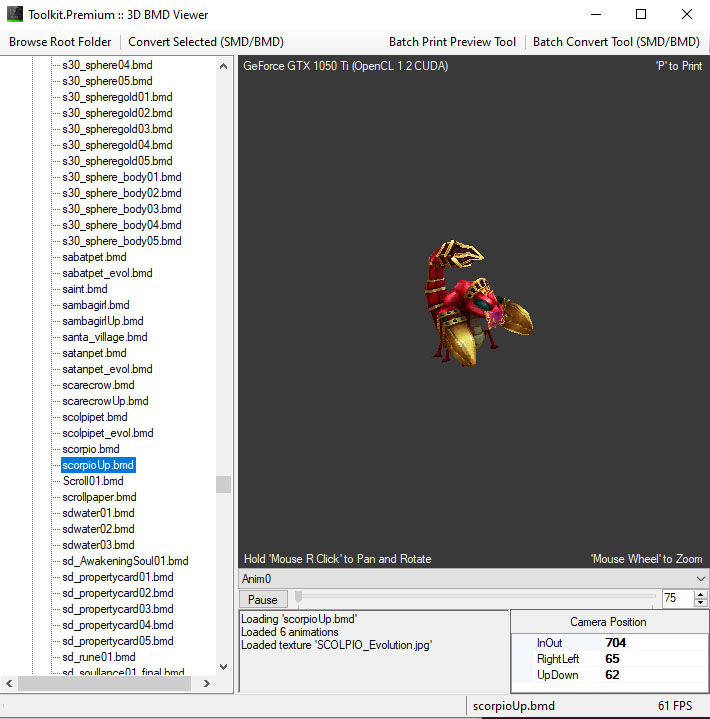
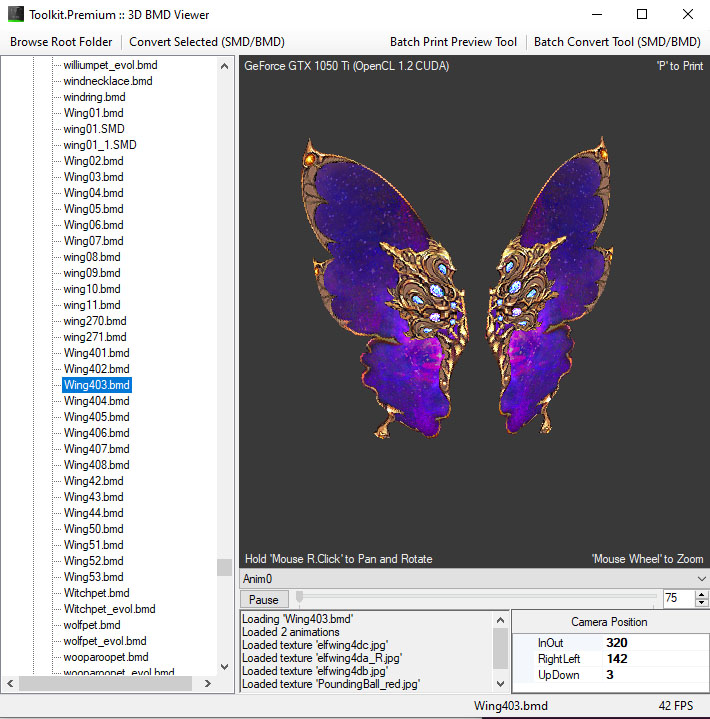
Extends functionality of IGC.Toolkit.Premium and MU.Toolkit.Premium products with ability to view** the 3D model encoded inside a BMD file.
Features:
- One-time payment
About BMD 3D Viewer ToolKit Plugin
Extends functionality of IGC.Toolkit.Premium and MU.Toolkit.Premium products with ability to view** the 3D model encoded inside a BMD file.
Features:
- Converts the MU model to SMD, and from SMD back to BMD, including model Animations - batch conversion supported
- Allows to print** any MU model to a PNG image, which can be later used for own liking - batch printing supported**
Model Preview Generation is officially supported only on AMD\NVIDIA Graphics Cars (INTEL NOT SUPPORTED)
** This plugin requires ToolKit version 1.11.0.0 or greater
The BMD 3D Viewer Plugin purchase applies to single ToolKit license. To have the plugin activated on more ToolKit licenses make a purchase of appropriate number of the plugin licenses.
Temporary activation of the plugin occurs manually after purchase. Please accept 24h for activation.
-
-
How can I pay for the service?
We accept two payment methods:
- PayPal: with a PayPal account, or with a card through PayPal (Visa, Mastercard, American Express, Discover)
- Cryptocurrency: write to us for the details. A Server Suite license paid with cryptocurrency starts with 60 days instead of 30.
Would you like to pay another way? Ask us whether we can arrange it for you.
-
How do I select hosting for my server?
First think about what you expect from the server, above all the number of players you want online at most.
Up to 500 players a VPS can be enough, though it is not always cheaper. For more active players a dedicated server is the better choice.
The server requirements calculator shows how much memory, processor and disk your setup needs: choose the players, servers and realms you plan to run.
Will the server be global, or for one region?
This matters a lot when you choose the hosting. A server for one region should be hosted where the latency (connection delay) to and from that region is lowest. A global server needs the lowest latency for most of your target regions.
-
Server requirements (hardware and software)
The hardware a server needs depends on the number of GameServers and on their player limits, not on the players online at the moment: each GameServer sets aside memory for its whole player limit when it starts.
The server requirements calculator shows the memory, processor and disk for your own setup, and explains every number.
The package as shipped (500 players per server)
- Season 22 (IGC.Premium Plus: 6 GameServers, 2 DataServers, ConnectServer, ChatServer): 16 GB RAM, 4 cores (6 recommended), 200 GB NVMe SSD
- Season 6 (IGC.Premium: 2 GameServers, DataServer, ConnectServer, ChatServer): 8 GB RAM, 4 cores (6 recommended), 200 GB NVMe SSD
The processor needs AVX support. Count physical cores of 3.5 GHz or more (4.5 GHz recommended).
Software
-
Operating System, x64 only
- Windows Server 2012 or later
- Windows 7, Windows 8, Windows 10 or later
-
Database Engine
- Minimum: Microsoft SQL Server 2012 (SQLEXPRADV_x64_ENU.exe) or later
- Recommended: Microsoft SQL Server 2019 or later
- The free SQL Server Express allows 10 GB per database, enough for most servers
- Visual C++ Redistributable: Microsoft Visual C++ 2015-2022 Redistributable Package (x64), download, install it on the server machine
- Microsoft .NET Framework 4.8, download, install it on the server machine
- File compression, to extract the files we ship: any program that opens .rar, for example WinRAR or 7-Zip
- Text editor, to view and edit the configuration files: any you like, for example Notepad++
- Lua scripting: any editor, online or installed, that checks the syntax of Lua 5.3
-
Renewal payments, are they required?
Yes. The Server Suite is a subscription: the first payment buys the license with its first period, and then you renew it for the term you choose.
- IGC.Premium (Season 6 Episode 3): renewal every 30 or 360 days
- IGC.Premium Plus (latest season): renewal every 30, 180 or 360 days
The first period is 30 days when you pay with PayPal and 60 days when you pay with cryptocurrency. The prices of the license and of each renewal term are in the Store.
-
Server files installation, is it included?
Yes, installation is offered within purchase price of first license of server suite subscription.
Check simple requirements to qualify and apply for the service. Read more at the article.
-
What is the renewal payment for?
As all of our plans are based on subscription model, renewing the subscription is mandatory to be able to run and use the software. Active subscription offers ability to use additional benefits, such as support area, receive maintenance updates within purchased season. It is also allowing to keep the services and products quality improving making sure of best level of satisfaction of our customers.
-
Cost of upgrade to next season or episode
IGC.Premium Plus is bought with a selected season and part.
Each new season part is a season pass: the upgrade of your server license to that version. Season passes are bought in the License Manager, where each one shows its price. The price depends on how much content the season part brings.
- A new server license includes the upgrades to new seasons released in its first 3 months.
- With an active Pro or Pro Max plan (an add-on to your server license, in the License Manager), the newer season passes are included while the plan is active. The License Manager shows which ones.
-
Do you offer Website or Webshop?
Currently there is no web related service or product available from us.
A third-party service offers a fully compatible website - WebEngineCMS -
Is hosting included?
Hosting must be purchased separately from third-party service vendor. We recommend to check www.ovh.com offer.
-
Can I use IGC.ToolKit (Premium) on my personal computer?
Yes, ToolKit (Premium) can be used on personal or any other computer of your choice.
-
What is the difference between Universal and IGC ToolKit (Premium)?
It is the same tool. Which editors and features it offers depends on your Server Suite (IGC.Premium / IGC.Premium Plus) subscription.
Every customer with an active server license subscription gets the IGC version of ToolKit (Premium). Customers without an active subscription, or without a server license, get the Universal version (earlier called MU).
What is the IGC version?
The full version, with every editor and export option for the IGC Server Suite files (tool plugins are sold separately).
What is the Universal version?
The premium version without the editors and export options made only for the IGC Server Suite files.
And ToolKit (Lite)?
ToolKit (Lite) is included in every IGC Server Suite package, for the most common files. See the ToolKit page for what each version offers.
The switch between IGC and Universal is automatic and follows the status of your server license subscription. The tool may need a restart to apply it.
-
Premium Tools Requirements (ToolKit & Launcher)
IGC.Launcher (Premium)
-
Client side
- Operating System: Windows XP or later, x86 / x64
- .NET Framework: 3.5 at least, 4.5.2 recommended (TLS 1.2 certificate support)
-
Server side
- Operating System: Windows Server 2008 R2 or later, x86 / x64
- .NET Framework: 4.8 (with the available Windows Updates)
IGC.ToolKit (Premium)
- Operating System: Windows Vista or later, 64-bit only
- .NET Framework: 4.6.1
- Internet connection: required while ToolKit (Premium) is running (no offline mode)
-
Client side
Frequently Asked Questions
Check entire FAQ or Contact us if you have any other questions - we'd be happy to help.
-